Victron's SmartSolar MPPT charge controllers come in two communication variants: VE.Direct and VE.Can. They both do the same core job — converting solar energy into battery charge — but the way they talk to the rest of your system is fundamentally different. This guide explains which protocol you need and why it matters for your installation.
VE.Direct vs VE.Can: The Core Difference
VE.Direct and VE.Can are two separate digital communication protocols developed by Victron Energy. They use different cables, different connectors, and different data architectures. You cannot convert one to the other with a simple adapter.
- VE.Direct is a point-to-point serial connection. One cable connects one device to one port. It uses a JST-PH connector and carries data at 19200 baud.
- VE.Can is a networked bus protocol based on the CAN-bus standard (the same technology used in vehicle ECU networks). Multiple devices share a single data bus using RJ45 connectors and requires termination at each end.
Which MPPT Models Use Which Protocol?
The protocol is determined by the MPPT model, not by a setting you can change. Here's how Victron's lineup breaks down:
| MPPT Range | Protocol | Models |
|---|---|---|
| SmartSolar 75V series | VE.Direct | 75/10, 75/15 |
| SmartSolar 100V series | VE.Direct | 100/15, 100/20, 100/30, 100/50 |
| SmartSolar 150V series (small) | VE.Direct | 150/35, 150/45 |
| SmartSolar 150V series (large) | VE.Direct or VE.Can | 150/60, 150/70, 150/85, 150/100 |
| SmartSolar 250V series | VE.Direct or VE.Can | 250/60, 250/70, 250/85, 250/100 |
The larger 150V and 250V models (60A and above) are available in both VE.Direct and VE.Can variants. These are separate products with different part numbers — you choose at the time of purchase. The smaller models (up to 150/45) are only available as VE.Direct.
When VE.Direct Is the Right Choice
For the vast majority of UK installations — campervans, motorhomes, boats, small off-grid cabins — VE.Direct is all you need. Here's why:
- Simple wiring. One cable from the MPPT to your GX device (Cerbo GX, Venus GX) or directly to a VE.Direct Bluetooth dongle.
- Lower cost. VE.Direct models are typically £20–£60 cheaper than their VE.Can equivalents at the same amperage.
- Bluetooth built in. All SmartSolar VE.Direct models include Bluetooth for configuration via the VictronConnect app.
- VE.Smart Networking. VE.Direct MPPTs can use Bluetooth-based VE.Smart Networking to synchronise charging across multiple controllers without any GX device.
If you're running one or two MPPTs with a battery bank of 400Ah or less, VE.Direct handles everything you need.
When You Need VE.Can
VE.Can becomes necessary — or strongly preferable — in larger, more complex systems. The key scenarios are:
1. Large Systems with 3+ MPPT Controllers
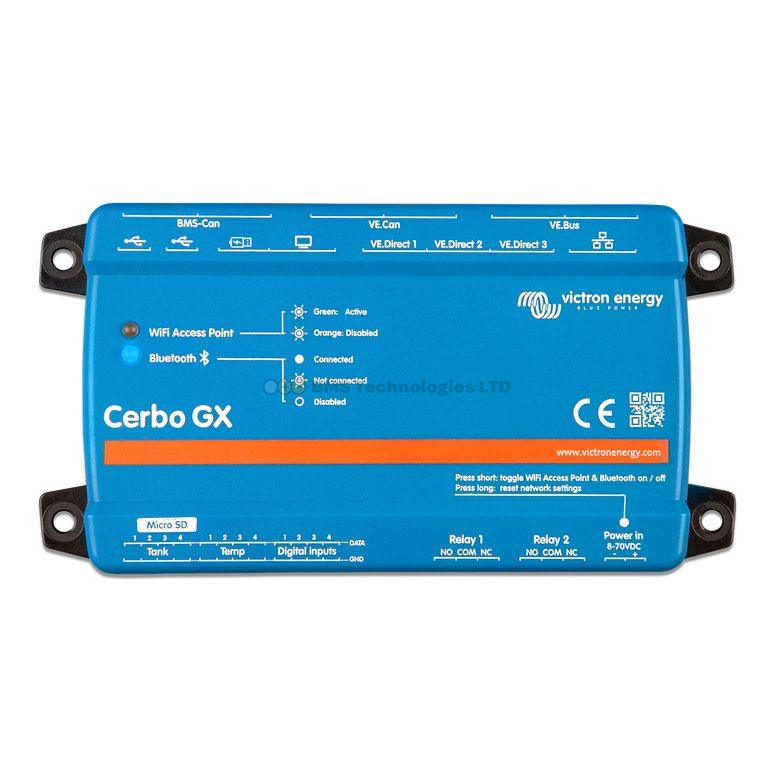
A Cerbo GX has three VE.Direct ports. If you have four or more MPPTs, you'd need a USB-to-VE.Direct adapter for each additional controller — and even then, there's a practical limit. VE.Can solves this: up to 25 devices can share a single CAN-bus, connected with standard RJ45 cables daisy-chained between units.
2. Parallel MPPT Synchronisation via DVCC
When multiple MPPTs charge the same battery bank, you want them to transition between charge phases (bulk, absorption, float) simultaneously. VE.Can MPPTs connected to a GX device with DVCC (Distributed Voltage and Current Control) enabled achieve this automatically and more reliably than Bluetooth-based VE.Smart Networking.
3. Professional and Commercial Installations
CAN-bus is an industrial-grade protocol. It's more robust over long cable runs (up to 250m at 250 kbps), supports error detection, and handles network congestion gracefully. For a 48V off-grid home or commercial site, VE.Can is the professional standard.
4. Systems Requiring Firmware Updates via GX
VE.Can MPPTs can receive firmware updates directly through the GX device over the network. VE.Direct MPPTs must be updated individually via Bluetooth using the VictronConnect app — less convenient when you have many controllers.
How Each Protocol Connects to a Cerbo GX
| Feature | VE.Direct | VE.Can |
|---|---|---|
| Connector type | JST-PH (proprietary) | RJ45 (standard Ethernet) |
| Ports on Cerbo GX | 3 built-in | 1 built-in (BMS-Can port usable too) |
| Devices per port | 1 | Up to 25 on the bus |
| Expandable | Via USB-to-VE.Direct adapters | Daisy-chain with RJ45 cables |
| Cable length | Up to 10m (max) | Up to 250m total bus length |
| Termination needed | No | Yes — 120 ohm terminators at each end |
| DVCC sync | Supported via GX | Supported via GX (more robust) |
For VE.Can, you'll need two RJ45 terminator plugs (supplied with VE.Can MPPTs) — one at the first device and one at the last device in the chain. Forgetting the terminators is a common cause of communication errors.
Price Difference
The VE.Can variants carry a premium over their VE.Direct equivalents. Here's a typical price comparison for the most popular large models:
| Model | VE.Direct (approx.) | VE.Can (approx.) | Difference |
|---|---|---|---|
| SmartSolar 150/60 | £320–£370 | £370–£430 | ~£50–£60 |
| SmartSolar 150/85 | £420–£480 | £480–£540 | ~£50–£60 |
| SmartSolar 150/100 | £480–£540 | £540–£600 | ~£50–£60 |
| SmartSolar 250/100 | £520–£580 | £580–£650 | ~£50–£70 |
The premium is consistent — roughly £50–£70 across the range. This pays for the CAN-bus transceiver hardware and RJ45 interface.
Can You Mix VE.Direct and VE.Can in the Same System?
Yes, absolutely. A GX device like the Cerbo GX can manage both VE.Direct and VE.Can devices simultaneously. For example, you might have two SmartSolar 100/30 (VE.Direct) controllers on a van roof and later add a larger SmartSolar 250/100 (VE.Can) ground-mount array. The Cerbo GX treats all MPPTs the same in its monitoring interface and DVCC calculations.
VE.Smart Networking: The VE.Direct Alternative to CAN-bus Sync
If you have multiple VE.Direct MPPTs but no GX device, VE.Smart Networking provides synchronised charging over Bluetooth. All SmartSolar VE.Direct controllers support this feature. You create a network in the VictronConnect app, and the controllers share voltage, current, and temperature data wirelessly.
VE.Smart Networking is effective for 2–4 MPPTs in close proximity (Bluetooth range, typically 5–10m in practice). For larger systems or installations where controllers are far apart, VE.Can with a GX device is more reliable.
For a full walkthrough of multi-MPPT setups, see our guide on connecting multiple Victron MPPT controllers in parallel.
Which Should You Buy? Our Recommendation
For most UK users — whether you're fitting out a campervan, canal boat, or small off-grid system — VE.Direct is the right choice. It's cheaper, simpler to wire, and works perfectly with a Cerbo GX for monitoring and DVCC charge synchronisation.
Choose VE.Can if any of the following apply:
- You're installing 4 or more MPPT controllers
- Your controllers will be more than 10m from the GX device
- You're building a 48V off-grid system with professional installation
- You want the robustness of CAN-bus for a mission-critical power system
If you're unsure or planning to start small and expand later, buy VE.Direct now. You can always add VE.Can controllers later — the two protocols coexist happily on the same GX device.
Summary
VE.Direct is a simple, affordable point-to-point connection ideal for systems with 1–3 MPPT controllers. VE.Can is a robust networked bus designed for larger installations with many devices, longer cable runs, and professional-grade reliability. Both protocols are fully supported by the Cerbo GX, and you can mix them in the same system. For the typical UK leisure or small off-grid installation, VE.Direct delivers everything you need at a lower price point.